
Workspace · GST
GST Return Downloader
Download GST returns and ledgers for all your clients in one run. Add your clients - type them, paste them from Excel or load them from CA PRO - press Start, and sign in to GST Portal for each client yourself. Every file lands in that client's own folder on your computer.
- Never asks for your GST password
- Never files, pays or submits
- Files go straight to your computer
Video guide
From installing CA PRO to every client downloaded
Real GST Desk screens with three sample clients and a demonstration run: what you set up once, and the GST Portal sign-in you do for each client. Press a step to play the video from there. 1:51, narrated, with captions.
The steps
How it works
Set up once. Then you only sign in.
Three steps you do once, and one you repeat for each client: the GST Portal sign-in. Everything after the sign-in runs by itself.
-
Step 1
Add CA PRO to Chrome
Install it from the Chrome Web Store and sign in with your firm's Google account.
-
Step 2
List your clients
In GST Desk, type or paste each client's name and GSTIN, or press Load my firm's clients. Just those two - never a password.
-
Step 3
Choose, then Start
Pick the monthly, quarterly or annual pack and its period. Open GST Portal in a Chrome tab, then press Start.
-
For each client
Step 4
Sign in, and it downloads
CA PRO asks for each client by name. Sign in to GST Portal with the login Chrome saved for them, or type it, and enter the captcha. Their files download; then it signs out and asks for the next client.
The client list comes with CA PRO version 1.4.11. Until Chrome updates yours, GST Desk starts from a task workbook instead - see the task workbook below.
The tool
GST Desk
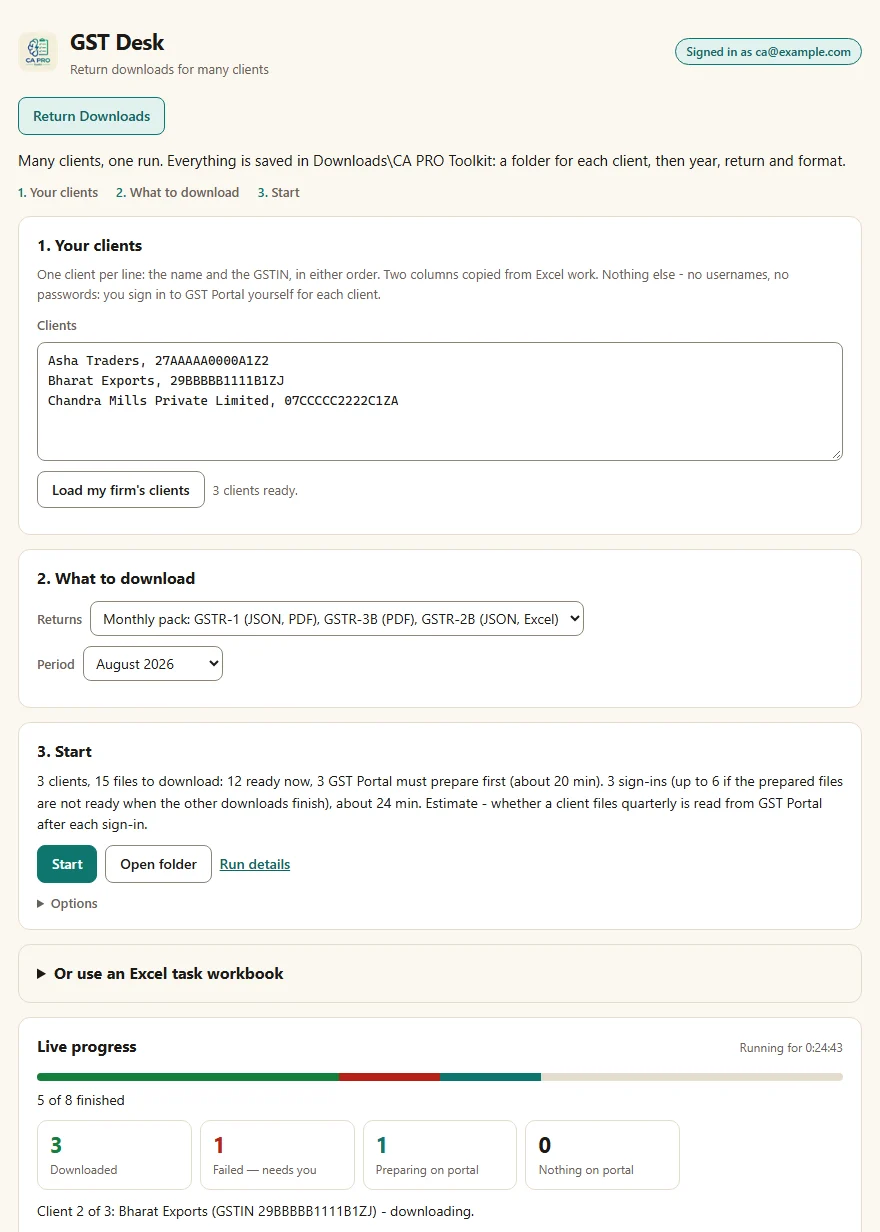
The same GST Desk the extension opens in its own tab, shown here from the CA PRO extension in this browser. You still sign in to GST Portal for each client yourself.
Looking for the CA PRO extension in this browser...
The desk is the extension's own page in a frame: this website's scripts cannot read anything in it.
What it downloads
One pack for every client
Choose a pack and its period in GST Desk, and every client in your list gets the same returns and formats.
Monthly pack
GSTR-1 (JSON, PDF), GSTR-3B (PDF) and GSTR-2B (JSON, Excel), for the month you choose.
Quarterly pack
The same returns for a quarter. For a quarterly filer, a month with no return of its own is shown as not due, never as missing.
Annual pack
GSTR-9 (PDF), GSTR-9C (PDF) and the year's GSTR-2B (JSON, Excel).
Ready at once
Downloaded as soon as it is that client's turn.
- GSTR-1 PDF, Excel
- GSTR-3B PDF, Word, JSON
- GSTR-2B PDF, Excel, Word, JSON
- ECL PDF, Excel
- ECASH PDF, Excel
GST Portal prepares it first
The portal builds the file first, usually in about 20 minutes. GST Desk shows it as Preparing on portal until you come back for it.
- GSTR-1 JSON
- GSTR-2A Excel, JSON
- GSTR-9 PDF, Excel, JSON
- GSTR-9C PDF, Excel, JSON
- GSTR-9 8A Excel
Prefer a task workbook? For a different set of returns for each client
An Excel file with one row per client, return and format. In GST Desk, Create a task workbook saves one in Downloads\CA PRO Toolkit\Plans, with your firm's clients already in it when CA PRO knows them. A workbook also reaches the returns no pack has: GSTR-2A, GSTR-9 Table 8A and the two ledgers.
- Client The name you want on the client's folder.
- GSTIN The client's 15-character GSTIN. Every file is bound to it.
- FY The financial year, for example 2025-26.
- Return GSTR-1, GSTR-3B, GSTR-2A, GSTR-2B, GSTR-9, GSTR-9C, GSTR-9 8A, ECL (credit ledger) or ECASH (cash ledger).
- Format PDF, Excel, JSON or Word - whichever that return offers.
- Months For example Apr-Jun, or Apr, May. Empty for an annual return or a ledger.
There is no password column, and a workbook with one is refused unread: CA PRO never reads GST passwords.
| Client | GSTIN | FY | Return | Format | Months | |
|---|---|---|---|---|---|---|
| 2 | Sample Retail Co | 27AAAAA0000A1Z5 | 2025-26 | GSTR-3B | Apr-Jun | |
| 3 | Sample Retail Co | 27AAAAA0000A1Z5 | 2025-26 | GSTR-1 | Excel | Apr-Jun |
| 4 | Sample Retail Co | 27AAAAA0000A1Z5 | 2025-26 | ECL |
Your files
Every file in its client's folder
Saved under CA PRO Toolkit in your Downloads folder: a folder for each client, then the year, the return and the format. Every file name keeps the GSTIN and the period.
The client's folder takes its name from your client list, your workbook or your firm's clients in CA PRO, and keeps it from then on; until a name is known it is the GSTIN alone.
A month GST Portal could not produce is shown as Failed — needs you, with the reason the portal gave. It is never shown as downloaded, and nothing is marked filed or verified.
- Downloads
- CA PRO Toolkit
- Sample Retail Co (27AAAAA0000A1Z5)
- FY 2025-26
- GSTR-1
- JSON
- 27AAAAA0000A1Z5_GSTR-1_2025-26_April.zip
- JSON
- GSTR-3B
- GSTR-2B
- GSTR-1
- FY 2025-26
- Sample Retail Co (27AAAAA0000A1Z5)
- CA PRO Toolkit
Safe by design
What it never does
-
Your password stays with you
You sign in to GST Portal yourself - with the login Chrome saved, or typed - and you enter the captcha. CA PRO never reads, stores or types a password, and never solves the portal's checks.
-
Download and check only
It never files, submits, pays or e-signs anything, and it refuses any control on the portal shaped like those.
-
Files go straight to you
Returns go from GST Portal to your Downloads folder. This website never visits the portal and never receives your files.
-
One client at a time, in order
GST Portal keeps one signed-in taxpayer per browser, so CA PRO works through your list one client after another, from a single Start, and only for the GSTIN you signed in as.
For your firm
Your firm's year board
Sign in with the same Google account your firm uses in CA PRO, and this page shows what the extension recorded for your firm: for each client and return, what each download run found, month by month. It reads the same records the extension's popup and the Windows app's Imports → GST downloads page show. Records exist only if your firm's recording setting is on and a run has happened.
Sign-in runs through Google; this page receives your name, email and firm from CA PRO's server and nothing else. It never sees the GST Portal.
Questions
Before you start
Can this website download my returns?
No. This page cannot download anything: the website never visits the GST Portal, never sees your portal credentials, and never receives your return files. The downloads happen in the CA PRO extension, in a GST Portal session you sign in to yourself, and the files go from the portal straight to your computer's Downloads folder.
Does it work for many clients at once?
From one Start, one client after another. GST Portal keeps one signed-in taxpayer per browser, so CA PRO works through your list in order and asks you to sign in as each client in turn. A client whose files are all already saved is not asked for at all.
What do I need?
Google Chrome on your computer, the CA PRO extension signed in with your firm's Google account, and each client's GST Portal login. GST Desk and the client folders come with extension version 1.4.10, and the typed client list with 1.4.11; Chrome installs each version by itself. Without the extension, the GST Desk section above says how to add it.
What if a file is not ready, or fails?
A file GST Portal is still preparing is reported as preparing on portal, so you can come back for it. A month the portal could not produce is reported as Failed — needs you, with the reason the portal gave. Nothing is ever shown as downloaded unless it was saved.
What leaves this computer?
GST files go from GST Portal straight to your Downloads folder. CA PRO's servers receive a month of GSTR-2B only when you press Send to reconciliation, to turn it into review rows for your firm. While your firm's recording setting is on, a run's record goes to your firm's CA PRO account: which files were saved and whether GSTR-1 and GSTR-3B showed as filed - never a file's contents. Details are in the privacy policy.